
12 KiB
email setup
#
#
Introduction
Setting up email automation on my primary desktop.
TL;DR
To tidy emails:
$ mbsync -a --pull  # fetch new emails from providers
$ cleanupmbox       # apply automatic rules (on local copy)
$ mbsync -a --push  # propagate deletes/moves back to providers
$ notmuch new       # recognize new mail
Read email locally (with favored maildir++-compliant reader),
and/or enjoy tidied email on provider's system (e.g. gmail in browser)
Alternatively can search from command line:
$ notmuch search sometext
Overview
After some investigation settled on:
- isync
- (aka
mbsync) to synchronize provider email with a maildir tree - notmuch
- for offline email indexing/search.
- notmuch-emacs
- emacs module for local email reading
Wrote a custom python script cleanupmbox to operate programatically
on the local MAILDIR tree. Script has enough content to deserve its own page,
next after this one.
                                     /-------------\
                                     | cleanupmbox |
                                     \-------------/
                                          ^    .
                                          |    .
                                          |    .   +--------------------------------+
                                          |    ... | config                         |
                                          |        |  ~/.config/cleanmbox/rules.csv |
                                          |        +--------------------------------+
                                          |
                                          |
                                          |                     /-------\
                                          |                     | emacs |
                                          |                     \-------/
                                          |                         ^
                                          |                         |
                                          |                         |
                                          v                         |
                               +-----=--------------------+         |
  +----------+    /------\     |   +------------------+   |         |
  |   gmail  |<---+mbsync+---->|   | MAILDIR/gmail    |   |         |
  +----------+    \------/     |   +------------------+   |         v
                     .         |                          |     /-------\
                     .         |                          +---->|notmuch|
                     .         |                          |     \-------/
  +----------+    /------\     |   +------------------+   |         ^
  | hushmail |<---+mbsync+---->|   | MAILDIR/hushmail |   |         |
  +----------+    \------/     |   +------------------+   |         |
                     .         +--------------------------+         |
                     .                                              |
                     .                                              v
              +--------------+                        +---------------------------+
              | config       |                        | tag database              |
              |  ~/.mbsyncrc |                        |   MAILDIR/.notmuch/xapian |
              +--------------+                        +---------------------------+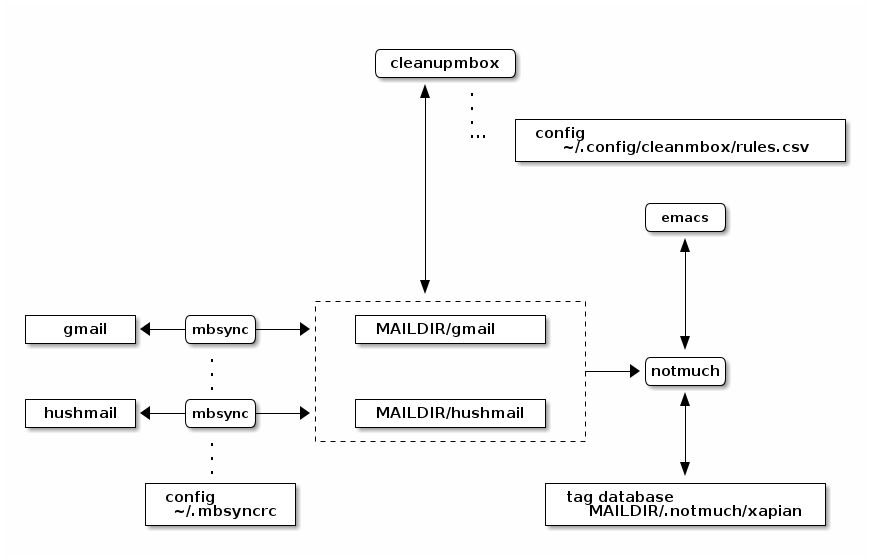
Notes:
mbsyncconfiguration in~/.mbsyncrc- emails kept under
~/.mail cleanmboxsymlinks to~/proj/env/bin/cleanupmbox.pycleanmboxrules in~/.config/cleanmbox/rules.csv
Goals
I had the following goals:
- automate email handling: want ability to move emails into folders based on pattern-matching rules
- fetch email from multiple providers (gmail, hushmail), browse from the same filesystem tree.
- synchronize email disposition with providers, so that using browser on their site (especially from phone) will provide an up-to-date view.
Links
- https://anarc.at/blog/2021-11-21-mbsync-vs-offlineimap/ isync vs offlineimap, plus useful example configuration.
- https://wiredspace.de/blog/mbsync/
- https://wiki.archlinux.org/title/Isync lovely isync configuration examples
Setup Instructions
Scaffold Maildir Tree
$ mkdir -p ~/.mail/gmail
$ mkdir -p ~/.mail/hushmail
Isync Setup
Install isync into shell environment; may want to later set this up to poll periodically.
$ nix-env -i isync
Anonymized configuration file:
hushmail part:
  # ~/.mbsyncrc

  IMAPAccount hushmail
  # address to connect
  Host imap.hushmail.com
  User replacewithuser@hushmail.com
  # if you're comfortable with plaintext:
  #Pass replacewithpassword
  #
  # PassCmd value encrypted with something like
  # $ echo replacewithpassword | gpg --recipient mygpgusername -a -o ~/.hushmail.gpg --encrypt
  PassCmd "gpg --no-tty --for-your-eyes-only -dq ~/.hushmail.gpg"
  # enable TLS
  SSLType IMAPS
  CertificateFile /etc/ssl/certs/ca-certificates.crt

  # remote
  IMAPStore hushmail-remote
  Account hushmail

  # local
  MaildirStore hushmail-local
  Subfolders Verbatim
  # must have trailing /
  Path ~/.mail/hushmail/
  Inbox ~/.mail/hushmail/Inbox

  Channel hushmail
  Far :hushmail-remote:
  Near :hushmail-local:
  # include everything for now
  Patterns *
  # auto-create missing mailboxes
  Create Both
  # delete messages (enable after seeing sync work)
  Expunge Both
  # save synchronization state
  SyncState *
  # propagate mailbox deletion (enable after seeing sync work)
  Remove both
gmail part:
  IMAPAccount gmail
  Host imap.gmail.com
  User replacewithuser@gmail.com
  # encrypted with something like
  # $ echo replacewithpassword | gpg --recipient mygpgusername -a -o ~/.gmail.gpg --encrypt
  PassCmd "gpg --no-tty --for-your-eyes-only -dq ~/.gmail.gpg"
  SSLType IMAPS
  CertificateFile /etc/ssl/certs/ca-certificates.crt

  # remote
  IMAPstore gmail-remote
  Account gmail

  # local
  MaildirStore gmail-local
  Subfolders Maildir++
  Inbox ~/.mail/gmail

  Channel gmail
  Far :gmail-remote:
  Near :gmail-local:
  MaxMessages 15000
  ExpireUnread yes
  #
  # in particular,  excluding:
  #  [Gmail]/Drafts, [Gmail]/Spam, [Gmail]/Trash
  #
  Patterns * ![Gmail]* "[Gmail]/Sent Mail" "[Gmail]/Important" "[Gmail]/Starred" "[GMail]/All Mail"
  #Patterns *
  Sync all
  Create Both
  Expunge Both
  SyncState *
  Remove both
Isync Use
sync email folders from all providers:
$ mbsync -a
or to just sync with hushmail provider
$ mbsync hushmail
To just propagate changes from gmail to local:
$ mbsync gmail --pull
Similarly, to just propagate changes to hushmail:
$ mbsync hushmail --push
Notmuch Setup
Installed notmuch via nix flake in my project xo-nix2.
see https://github.com/rconybea/xo-nix2/blob/mail/flake.nix
Accomplished this by adding notmuch, emacsPackages.notmuch to devShells.packages:
  devShells = {
    default = pkgs.mkShell.override
      { stdenv = env; }
      { packages = [ ...
                     pkgs.notmuch
                     pkgs.emacsPackages.notmuch
                     ...
                     ];
        };
    };
Installing this way ensures that emacs, notmuch and notmuch-emacs versions are coordinated.
notmuch gets setup interactively:
$ notmuch setup
Your full name:
Your primary email address: alice@gmail.com
Additional email address [Press 'Enter' if none]:
Top-level directory of your email archive:/home/alice/.mail
Tags to apply to all new messages (separated by spaces) [ unread inbox]:
Tags to exclude when searching messages (separated by spaces) [ junk]:
This creates empty tag database in MAILDIR=/.notmuch (/home/alice/.mail/.notmuch here)
Populate tag database with contents of MAILDIR:
$ notmuch new
Default notmuch-emacs setup is almost trivial.
In ~/.emacs:
(require 'notmuch)
(but also see M-x customize-group RET notmuch RET)
Now can browse email from emacs with M-x notmuch.
Outgoing Mail Setup
in ~/.emacs:
  (require 'smtpmail)

  (setq user-mail-address "replacewithuser@gmail.com"
        user-full-name "Alice Exampleton")

  (setq message-send-mail-function 'smtpmail-send-it)

  (setq smtpmail-stream-type 'starttls
        ;;smtpmail-default-smtp-server "smtp.hushmail.com"
        smtpmail-smtp-server "smtp.gmail.com"
        smtpmail-smtp-service 587
        )

  (setq message-kill-buffer-on-exit t)
For smtpmail, We also need ~/.authinfo to provide login credentials
machine smtp.gmail.com login replacewithuser@gmail.com port 587 password replacewithpassword
Here replacewithpassword needs to be a "google app password".
Obtain this from gmail.com -> account settings -> security -> 2-step verification -> app passwords
Now can send email with C-x m
Lessons and Tradeoffs
- for email syncing, I looked at
offlineimapandisync. Choseisyncbecause it's reported to be faster, and I had a large (100k+) backlog of email to deal with. This seems to have worked out well.isyncis designed to work with multiple email providers (whatisynccalls 'channels'). -
gmail eventually cuts off (or maybe times out) socket connections when trying to sync a large number of messages. Settled on 15k message cap for the gmail channel
# .mbsyncrc

Channel gmail
...
MaxMessages 15000
...
-
Scripting email-moving between
maildirdirectories is non-trivial. To do this correctly you need to update embedded email identifiers, otherwise synchronization won't be able to tell the difference between copy and move. Python has a builtin library (mailbox) that's simple to use, and takes care of this.It does come with a constraint: as far as I can tell, it expects email to be stored in the
maildir++format, rather than regularmaildir.In
maildir++, folder->filesystem structure is flattened. A folderfoo/barwill be stored in a directory.foo.bar, so typically would have all folders in a single directory.Multiple channels muddies the filesystem picture, since different channels will map to sibling filesystem directories.
For example:
${MAILDIR}
+- gmail
|  +- .receipts
|  +- .travel
|  ..
+- hushmail
   +- .policy
   ..
I originally looked at
mufor indexing (along withmu4efor email reading in emacs); however that project doesn't seem to handlemaildir++with multiple providers in separate directories like above.Fortunately,
notmuchaccomodates this, since it just needs a path under${MAILDIR}. For example: to look at emails ingmail/.receipts, usefolder:gmail/.receiptsin anotmuchsearch. - Needed a detour to setup PGP (see /git/roland/org-howto/src/branch/master/env/gpg-setup.org), to circumvent having plaintext passwords in configuration files.